nsquared agents

Downloads and guides for the nsquared agents desktop characters.

View on GitHub

Building a Simple Character

To build a character for nsquared agents, create a .NET 10 class library with a class that implements the IAgent interface. Install the current .NET 10 SDK and use the latest stable nsquared.agents.api NuGet package.

You will also need to have some images for the animated frames of the character. In this example we are using a small set of images to create a simple clippy character. These frames can be found in the sample Frames folder.

The full source code for this example

Step-by-Step creating a simple nsquared agent character

  1. Start by creating a new C# class library project named SimpleCharacter.

     dotnet new classlib --name SimpleCharacter
    

    This will create a new folder named SimpleCharacter containing C# project named SimpleCharacter, and a code file named Class1.cs.

  2. Rename the file Class1.cs to Character.cs
  3. Rename the class in the code to Character

     namespace SimpleCharacter;
     public class Character
     {
    
     }
    
  4. In the SimpleCharacter.csproj file set the target framework and plugin file extension:

     <TargetFramework>net10.0</TargetFramework>
     <TargetExt>.Agent</TargetExt>
    
  5. Add the API and Avalonia packages:

    dotnet add package nsquared.agents.api
    dotnet add package Avalonia
    

    dotnet add package selects the latest stable package unless a version is specified.

  6. In the SimpleCharacter folder create a new folder named Assets.
  7. In the new Assets folder create a folder named Frames.
  8. In the Frames folder copy the frame images from the sample Frames folder.
  9. In the Assets folder create a file named Actions.json. Define the animation actions and states in this file. See the Actions.json schema for the field reference.
  10. Edit the Actions.json file and put the following json to define two actions and two states.

    {
         "ActionItems": [
             {
                 "Name": "Show",
                 "Return": null,
                 "Frames": [
                     {
                         "SoundEffect": null,
                         "Duration": 10,
                         "ExitBranch": -1,
                         "Images": [
                             {
                                 "Filename": "0000",
                                 "OffsetX": 0,
                                 "OffsetY": 0
                             }
                         ],
                         "Mouths": [],
                         "Branches": []
                     }
                 ],
                 "Reverse": false,
                 "ActionMenuSelected": null
             },
             {
                 "Name": "Idle",
                 "Return": null,
                 "Frames": [
                     {
                         "SoundEffect": null,
                         "Duration": 10,
                         "ExitBranch": -1,
                         "Images": [
                             {
                                 "Filename": "0000",
                                 "OffsetX": 0,
                                 "OffsetY": 0
                             }
                         ],
                         "Mouths": [],
                         "Branches": []
                     },
                     {
                         "SoundEffect": null,
                         "Duration": 10,
                         "ExitBranch": -1,
                         "Images": [
                             {
                                 "Filename": "0045",
                                 "OffsetX": 0,
                                 "OffsetY": 0
                             }
                         ],
                         "Mouths": [],
                         "Branches": []
                     },
                     {
                         "SoundEffect": null,
                         "Duration": 10,
                         "ExitBranch": -1,
                         "Images": [
                             {
                                 "Filename": "0046",
                                 "OffsetX": 0,
                                 "OffsetY": 0
                             }
                         ],
                         "Mouths": [],
                         "Branches": []
                     },
                     {
                         "SoundEffect": null,
                         "Duration": 10,
                         "ExitBranch": 9,
                         "Images": [
                             {
                                 "Filename": "0047",
                                 "OffsetX": 0,
                                 "OffsetY": 0
                             }
                         ],
                         "Mouths": [],
                         "Branches": []
                     },
                     {
                         "SoundEffect": null,
                         "Duration": 10,
                         "ExitBranch": 9,
                         "Images": [
                             {
                                 "Filename": "0048",
                                 "OffsetX": 0,
                                 "OffsetY": 0
                             }
                         ],
                         "Mouths": [],
                         "Branches": []
                     },
                     {
                         "SoundEffect": null,
                         "Duration": 10,
                         "ExitBranch": -1,
                         "Images": [
                             {
                                 "Filename": "0049",
                                 "OffsetX": 0,
                                 "OffsetY": 0
                             }
                         ],
                         "Mouths": [],
                         "Branches": [
                             {
                                 "BranchTo": 8,
                                 "Probability": 3
                             }
                         ]
                     },
                     {
                         "SoundEffect": null,
                         "Duration": 15,
                         "ExitBranch": 8,
                         "Images": [
                             {
                                 "Filename": "0050",
                                 "OffsetX": 0,
                                 "OffsetY": 0
                             }
                         ],
                         "Mouths": [],
                         "Branches": [
                             {
                                 "BranchTo": 7,
                                 "Probability": 98
                             },
                             {
                                 "BranchTo": 6,
                                 "Probability": 2
                             }
                         ]
                     },
                     {
                         "SoundEffect": null,
                         "Duration": 10,
                         "ExitBranch": 9,
                         "Images": [
                             {
                                 "Filename": "0051",
                                 "OffsetX": 0,
                                 "OffsetY": 0
                             }
                         ],
                         "Mouths": [],
                         "Branches": []
                     },
                     {
                         "SoundEffect": null,
                         "Duration": 10,
                         "ExitBranch": -1,
                         "Images": [
                             {
                                 "Filename": "0052",
                                 "OffsetX": 0,
                                 "OffsetY": 0
                             }
                         ],
                         "Mouths": [],
                         "Branches": []
                     },
                     {
                         "SoundEffect": null,
                         "Duration": 10,
                         "ExitBranch": -1,
                         "Images": [
                             {
                                 "Filename": "0053",
                                 "OffsetX": 0,
                                 "OffsetY": 0
                             }
                         ],
                         "Mouths": [],
                         "Branches": []
                     },
                     {
                         "SoundEffect": null,
                         "Duration": 10,
                         "ExitBranch": -1,
                         "Images": [
                             {
                                 "Filename": "0000",
                                 "OffsetX": 0,
                                 "OffsetY": 0
                             }
                         ],
                         "Mouths": [],
                         "Branches": []
                     }
                 ],
                 "Reverse": false,
                 "ActionMenuSelected": null
             }
         ],
         "States": {
             "Showing": [
                 "Show"
             ],
             "IdlingLevel1": [
                 "Idle"
             ]
         }
     }
    

    More information on the schema for the Actions.json file.

  11. Include assets using the resource type expected by IAgent. Create Assets\Audio and add Assets\Icon.ico if using the paths shown below:

     <ItemGroup>
         <AvaloniaResource Include="Assets\**" />
         <AvaloniaResource Remove="Assets\Audio\**" />
         <None Remove="Assets\Frames\**" />
         <EmbeddedResource Include="Assets\Audio\**" />
     </ItemGroup>
    
  12. Edit Character.cs to implement IAgent. WakeWord, Personality, and Voice are optional; override them to customize voice activation and AI responses for the character.

     using nsquared.agents;
    
     namespace SimpleCharacter;
    
     public class Character : IAgent
     {
         public string Name { get; set; } = "SimpleCharacter";
         public string AssemblyName { get; set; } = "SimpleCharacter";
         public Uri ActionsFileUri => new($"avares://{AssemblyName}/Assets/Actions.json");
         public string AudioFilesPath => $"{Name}.Assets.Audio.";
         public string FrameAssetPath => $"avares://{AssemblyName}/Assets/Frames/";
         public string IconPath => $"avares://{AssemblyName}/Assets/Icon.ico";
         public string WakeWord => "SimpleCharacter";
         public string? Personality => "You are a friendly, concise desktop assistant.";
         public string? Voice => null;
     }
    
  13. Build the SimpleCharacter project. It should build the SimpleCharacter.Agent file in a bin folder.

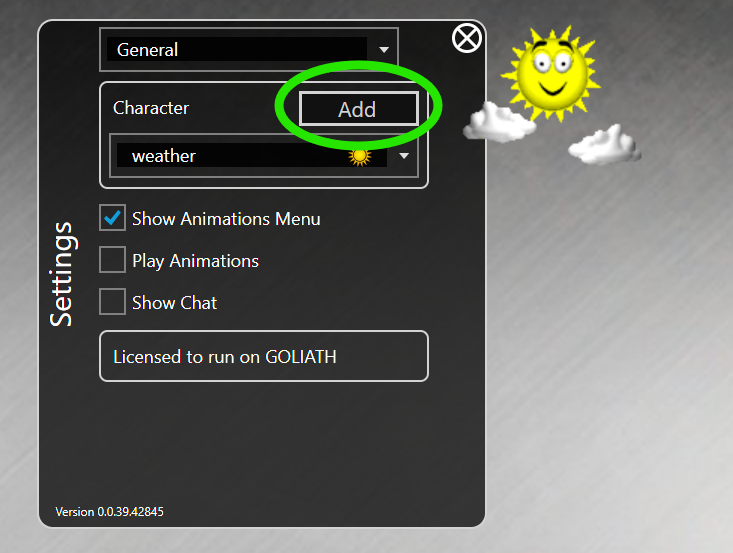
  14. Run the nsquared agents application and open Settings, and then go to the Add button next to the character list

    Add character

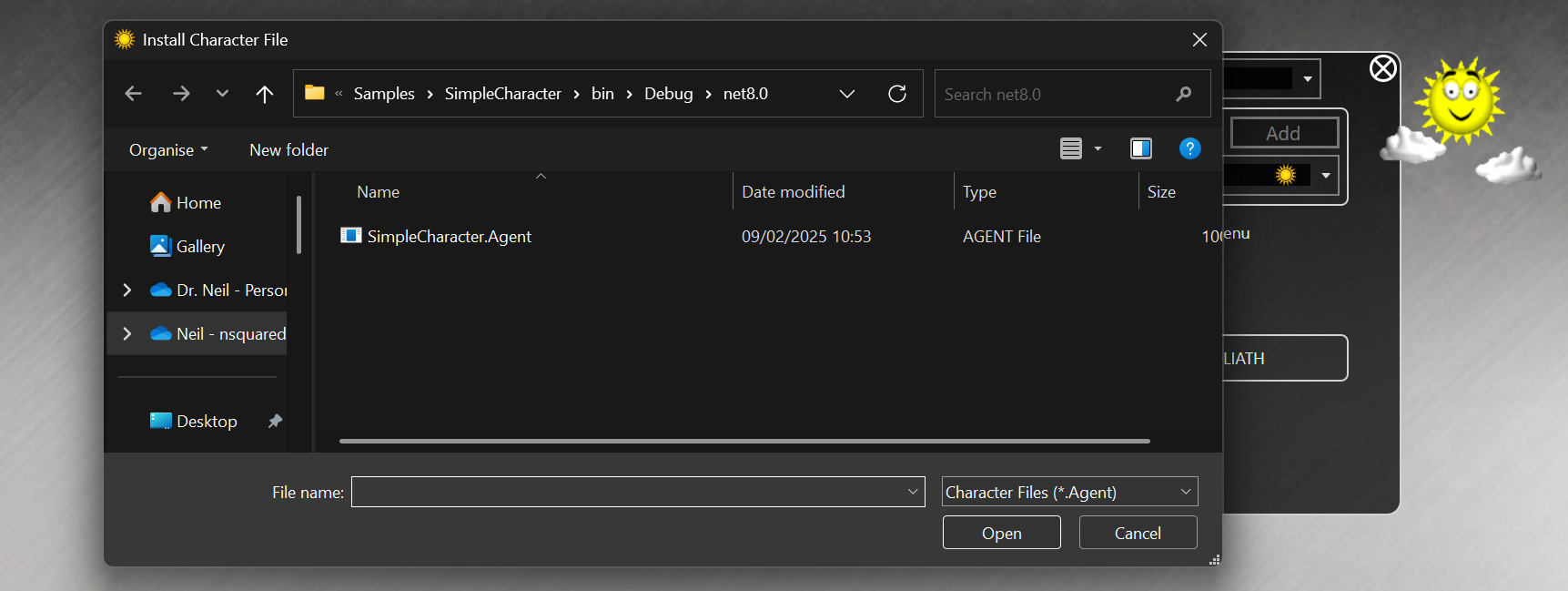
  15. This will open a file dialog. Find the SimpleCharacter.Agent file you built.

    Select SimpleCharacter.Agent file

  16. The new SimpleCharacter will be selected
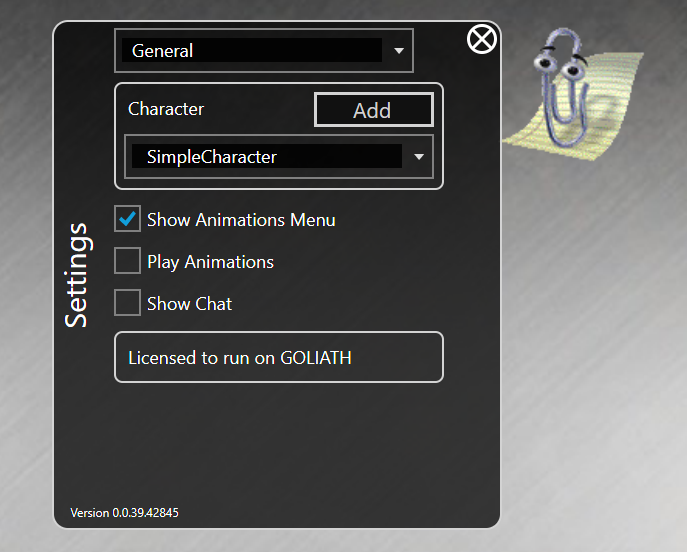
    SimpleCharacter selected

The full source code for this example