# Building a Simple Character
To build a character for nsquared agents, create a .NET 10 class library with a class that
implements the [`IAgent`](IAgent.md) interface. Install the current .NET 10 SDK and use the
latest stable `nsquared.agents.api` NuGet package.
You will also need to have some images for the animated frames of the character. In this example we are using a small set of images to create a simple clippy character. These frames can be found in the [sample **Frames** folder](https://github.com/nsquaredsolutions/agents/tree/main/Samples/SimpleCharacter/Assets/Frames).
> [The full source code for this example](https://github.com/nsquaredsolutions/agents/tree/main/Samples/SimpleCharacter)
## Step-by-Step creating a simple nsquared agent character
1. Start by creating a new C# class library project named SimpleCharacter.
```bash
dotnet new classlib --name SimpleCharacter
```
This will create a new folder named SimpleCharacter containing C# project named SimpleCharacter, and a code file named Class1.cs.
1. Rename the file `Class1.cs` to `Character.cs`
1. Rename the class in the code to `Character`
```cs
namespace SimpleCharacter;
public class Character
{
}
```
1. In the `SimpleCharacter.csproj` file set the target framework and plugin file extension:
```xml
net10.0
.Agent
```
1. Add the API and Avalonia packages:
```sh
dotnet add package nsquared.agents.api
dotnet add package Avalonia
```
`dotnet add package` selects the latest stable package unless a version is specified.
1. In the SimpleCharacter folder create a new folder named `Assets`.
1. In the new `Assets` folder create a folder named `Frames`.
1. In the `Frames` folder copy the frame images from the [sample **Frames** folder](https://github.com/nsquaredsolutions/agents/tree/main/Samples/SimpleCharacter/Assets/Frames).
1. In the `Assets` folder create a file named `Actions.json`. Define the animation actions and
states in this file. See the [Actions.json schema](ActionsSchema.md) for the field reference.
1. Edit the `Actions.json` file and put the following json to define two actions and two states.
```json
{
"ActionItems": [
{
"Name": "Show",
"Return": null,
"Frames": [
{
"SoundEffect": null,
"Duration": 10,
"ExitBranch": -1,
"Images": [
{
"Filename": "0000",
"OffsetX": 0,
"OffsetY": 0
}
],
"Mouths": [],
"Branches": []
}
],
"Reverse": false,
"ActionMenuSelected": null
},
{
"Name": "Idle",
"Return": null,
"Frames": [
{
"SoundEffect": null,
"Duration": 10,
"ExitBranch": -1,
"Images": [
{
"Filename": "0000",
"OffsetX": 0,
"OffsetY": 0
}
],
"Mouths": [],
"Branches": []
},
{
"SoundEffect": null,
"Duration": 10,
"ExitBranch": -1,
"Images": [
{
"Filename": "0045",
"OffsetX": 0,
"OffsetY": 0
}
],
"Mouths": [],
"Branches": []
},
{
"SoundEffect": null,
"Duration": 10,
"ExitBranch": -1,
"Images": [
{
"Filename": "0046",
"OffsetX": 0,
"OffsetY": 0
}
],
"Mouths": [],
"Branches": []
},
{
"SoundEffect": null,
"Duration": 10,
"ExitBranch": 9,
"Images": [
{
"Filename": "0047",
"OffsetX": 0,
"OffsetY": 0
}
],
"Mouths": [],
"Branches": []
},
{
"SoundEffect": null,
"Duration": 10,
"ExitBranch": 9,
"Images": [
{
"Filename": "0048",
"OffsetX": 0,
"OffsetY": 0
}
],
"Mouths": [],
"Branches": []
},
{
"SoundEffect": null,
"Duration": 10,
"ExitBranch": -1,
"Images": [
{
"Filename": "0049",
"OffsetX": 0,
"OffsetY": 0
}
],
"Mouths": [],
"Branches": [
{
"BranchTo": 8,
"Probability": 3
}
]
},
{
"SoundEffect": null,
"Duration": 15,
"ExitBranch": 8,
"Images": [
{
"Filename": "0050",
"OffsetX": 0,
"OffsetY": 0
}
],
"Mouths": [],
"Branches": [
{
"BranchTo": 7,
"Probability": 98
},
{
"BranchTo": 6,
"Probability": 2
}
]
},
{
"SoundEffect": null,
"Duration": 10,
"ExitBranch": 9,
"Images": [
{
"Filename": "0051",
"OffsetX": 0,
"OffsetY": 0
}
],
"Mouths": [],
"Branches": []
},
{
"SoundEffect": null,
"Duration": 10,
"ExitBranch": -1,
"Images": [
{
"Filename": "0052",
"OffsetX": 0,
"OffsetY": 0
}
],
"Mouths": [],
"Branches": []
},
{
"SoundEffect": null,
"Duration": 10,
"ExitBranch": -1,
"Images": [
{
"Filename": "0053",
"OffsetX": 0,
"OffsetY": 0
}
],
"Mouths": [],
"Branches": []
},
{
"SoundEffect": null,
"Duration": 10,
"ExitBranch": -1,
"Images": [
{
"Filename": "0000",
"OffsetX": 0,
"OffsetY": 0
}
],
"Mouths": [],
"Branches": []
}
],
"Reverse": false,
"ActionMenuSelected": null
}
],
"States": {
"Showing": [
"Show"
],
"IdlingLevel1": [
"Idle"
]
}
}
```
[More information on the schema for the `Actions.json` file.](ActionsSchema.md)
1. Include assets using the resource type expected by `IAgent`. Create `Assets\Audio` and add
`Assets\Icon.ico` if using the paths shown below:
```xml
```
1. Edit `Character.cs` to implement [`IAgent`](IAgent.md). `WakeWord`, `Personality`, and `Voice`
are optional; override them to customize voice activation and AI responses for the character.
```cs
using nsquared.agents;
namespace SimpleCharacter;
public class Character : IAgent
{
public string Name { get; set; } = "SimpleCharacter";
public string AssemblyName { get; set; } = "SimpleCharacter";
public Uri ActionsFileUri => new($"avares://{AssemblyName}/Assets/Actions.json");
public string AudioFilesPath => $"{Name}.Assets.Audio.";
public string FrameAssetPath => $"avares://{AssemblyName}/Assets/Frames/";
public string IconPath => $"avares://{AssemblyName}/Assets/Icon.ico";
public string WakeWord => "SimpleCharacter";
public string? Personality => "You are a friendly, concise desktop assistant.";
public string? Voice => null;
}
```
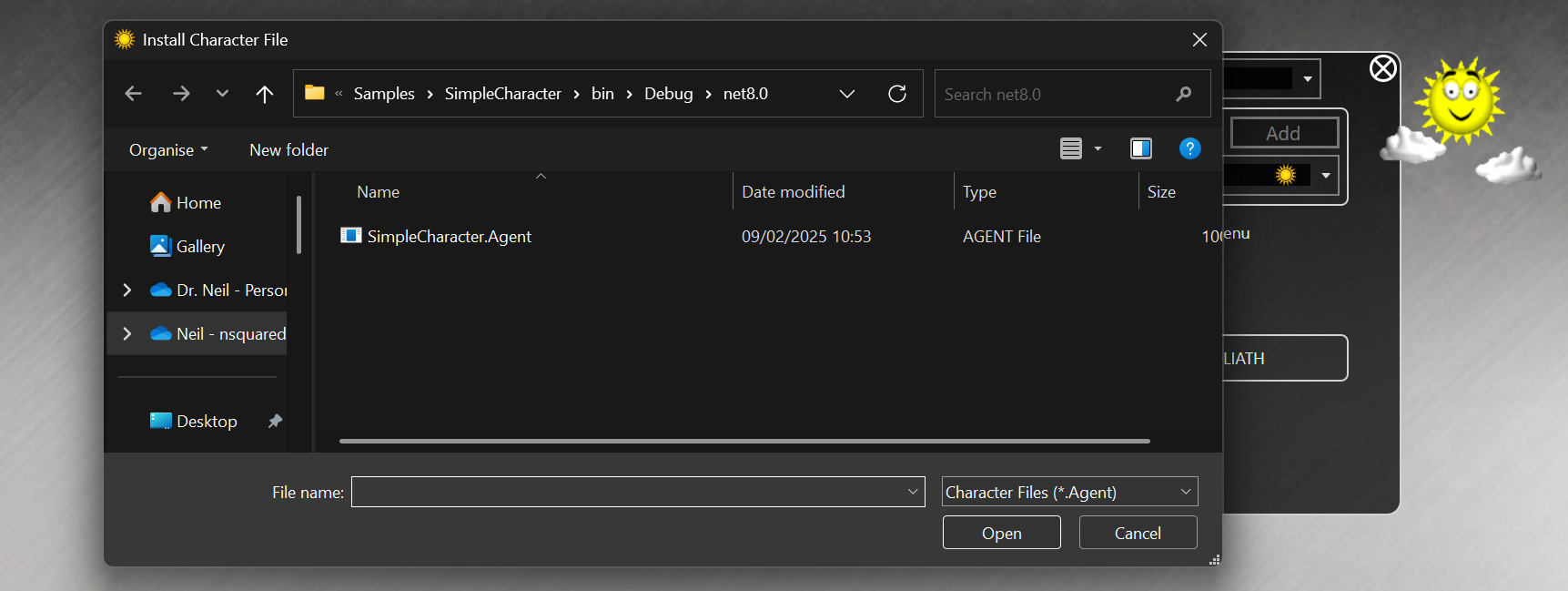
1. Build the SimpleCharacter project. It should build the `SimpleCharacter.Agent` file in a bin folder.
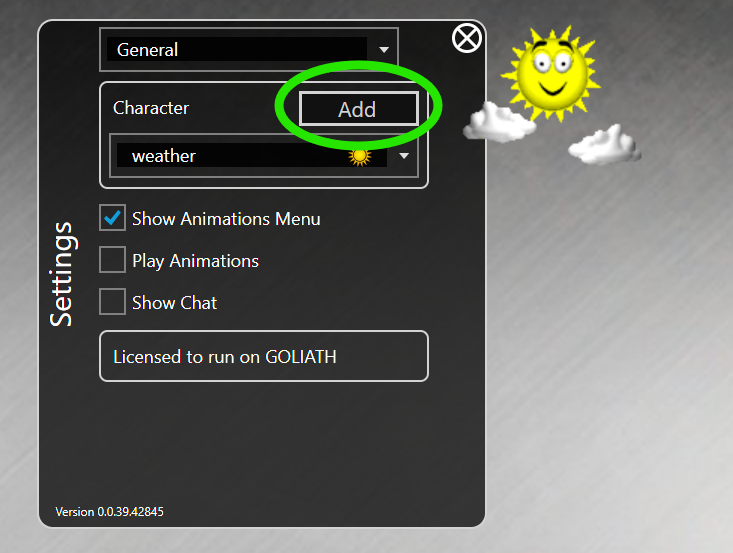
1. Run the nsquared agents application and open Settings, and then go to the `Add` button next to the character list
1. This will open a file dialog. Find the `SimpleCharacter.Agent` file you built.
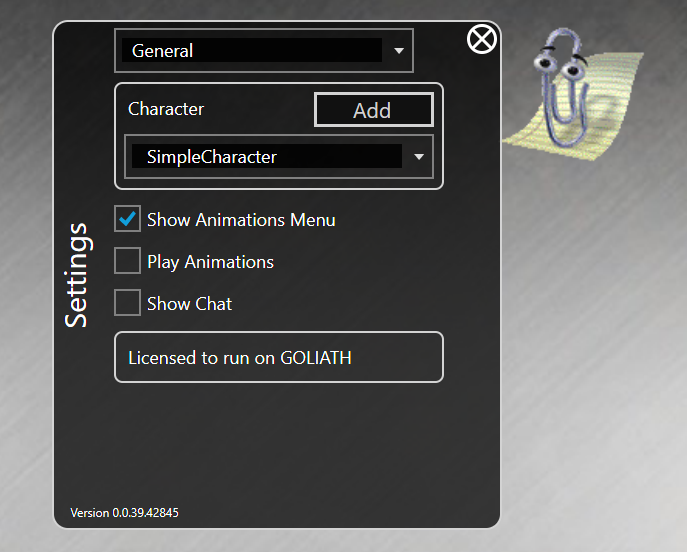
1. The new SimpleCharacter will be selected
> [The full source code for this example](https://github.com/nsquaredsolutions/agents/tree/main/Samples/SimpleCharacter)